Nord
The following solution is based on a nice little script from here, with some improvements and enhancements.
First, acquire a NordVPN access key from your account. Go to the NordVPN dashboard, and scroll down to "Advanced Settings -> Access Token -> Get Access Token".
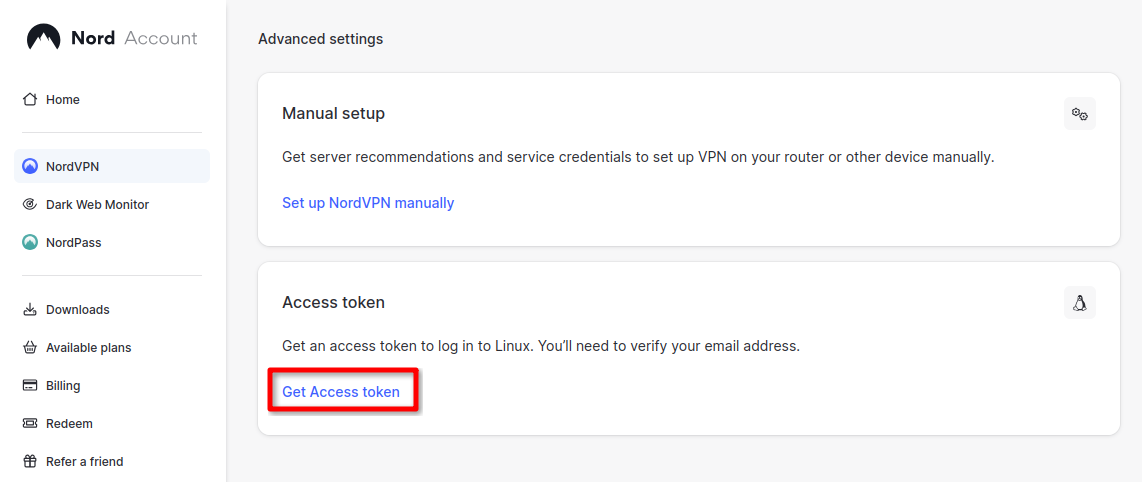
Generate a new token, and save it:

(Optional) In a terminal, set your NordVPN access token as an environment variable:
export NORDVPN_ACCESS_TOKEN=your_access_token
If you don't do this, you'll be prompted to enter it when you run the script anyway
You can add the line to your bash file to persist it if you're on a trusted device.
Next, start editing a new file:
sudo nano fetch_nord_servers.sh
Paste the below script:
#!/usr/bin/env bash

# Prompt for the access token if the environment variable is not set
if [ -z "$NORDVPN_ACCESS_TOKEN" ]; then
  read -s -p "Enter NORDVPN access token: " NORDVPN_ACCESS_TOKEN
  echo
fi

URL="https://api.nordvpn.com/v1/servers"
OUTPUT_DIR="config/nord/"
DNS="1.1.1.1"

mkdir -p "$OUTPUT_DIR"
rm -f "${OUTPUT_DIR}"/*.conf    # Deletes existing config files at output location

CREDENTIALS_URL="https://api.nordvpn.com/v1/users/services/credentials"

PRIVATE_KEY=$(curl -s -u token:"$NORDVPN_ACCESS_TOKEN" "$CREDENTIALS_URL" | jq -r .nordlynx_private_key)

curl -s "$URL" | \
  jq -r --arg pk "$PRIVATE_KEY" --arg dns "$DNS" --arg outdir "$OUTPUT_DIR" '
    .[] |
    {
      filename: (.locations[0].country.name + " - " + .locations[0].country.city.name + " - " + .hostname + ".conf"),
      ip: .station,
      publicKey: (.technologies | .[] | select(.identifier == "wireguard_udp") | .metadata | .[] | .value)
    } |
    {
      filename: .filename,
      config: [
        "# " + .filename,
        "",
        "[Interface]",
        "PrivateKey = \($pk)",
        "Address = 10.5.0.2/32",
        "DNS = \($dns)",
        "Table = off",
        "",
        "[Peer]",
        "PublicKey = " + .publicKey,
        "AllowedIPs = 0.0.0.0/0, ::/0",
        "Endpoint = " + .ip + ":51820"
      ] | join("\n")
    } |
    "echo \"" + .config + "\" > \"" + ($outdir + "/" + .filename) + "\""
  ' | sh
sudo chmod +x fetch_nord_servers.sh
./fetch_nord_servers.sh
Navigate to your output directory. By default, it's in the config/nord directory relative to your script location. You will find an assortment of config files, so take your pick.
This script adds the "Table = off" line by default, so you can ignore that part of the main guide.